
HeyGen Can Dub Your Videos Into Tamil. Proofread Them First.
HeyGen can re-voice your English videos in Hindi, Tamil and nine other Indian languages, lips and all. Whether the dub is usable depends on one step first-timers skip, Proofread, and this is how to use it.
HeyGen makes talking videos without a camera crew. Record about 15 seconds of yourself on a phone and Avatar V, its newest avatar model, turns that into a presenter who can read any script. Video Agent builds a whole video from one prompt. And Video Translate takes a video you already have and re-voices it in another language, moving the lips to match.
That last feature is the one to watch if you teach or make videos for Indian audiences. Hindi, Tamil, Telugu, Bengali, Marathi, Gujarati, Kannada, Malayalam, Punjabi, Odia and Urdu are all on its list. But the step that decides whether a dub is usable sits behind a button first-timers often skip.
Translate a Video: three choices before you upload
Go to Create, then Translate a Video. Upload a file or paste a public YouTube or Google Drive link. Then HeyGen asks three things:
- Hyperrealistic Translation or Audio Dubbing. The first syncs your lips and needs a visible face; the second only replaces the voice.
- Fast or Quality engine. Quality uses a more advanced model and costs more credits.
- Quick or Advanced Translate. Quick does up to five languages at once. Advanced is where the useful controls are.
Advanced, then Review and Edit: where Proofread hides
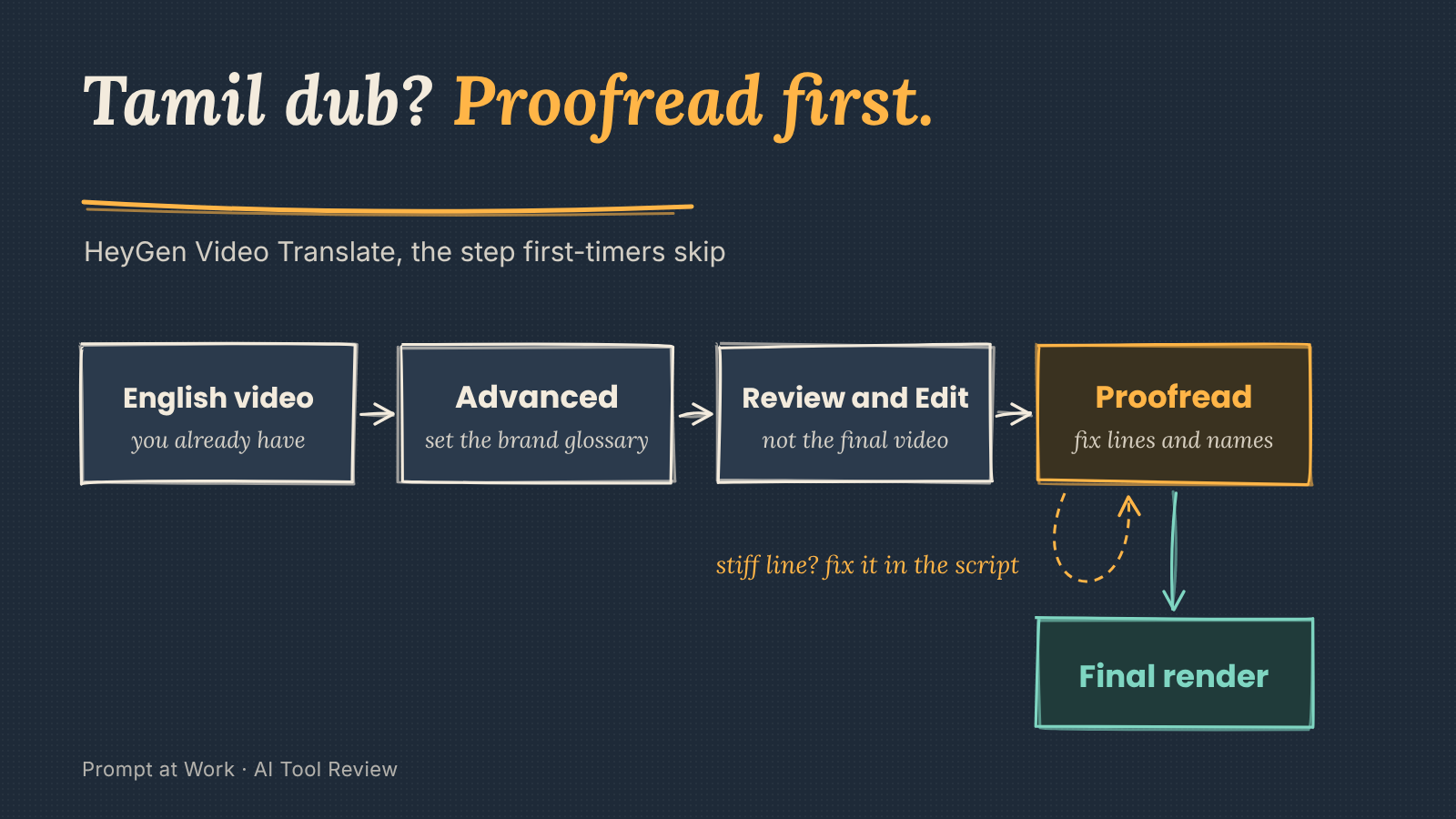
Advanced gives you a brand glossary, lip sync on or off, background sound removal, captions and your own SRT subtitles. Set up the glossary first. Add your course name, product names and the English terms your audience says in English anyway, so the Hindi version doesn't swap them for words nobody uses. HeyGen's guides don't tie the glossary or Proofread to a particular plan, so check inside your own account.
Then click Review and Edit instead of going straight to the final video. HeyGen puts a Proofread version in your library, with the translated script beside the video. There you can:
- rewrite stiff lines, and highlight a word to fix its pronunciation;
- swap the narration voice or use your own voice clone;
- download the script as Excel or SRT from the three-dot menu, edit it offline and upload it back.
Invite Proofreaders sends the link to a colleague who speaks the language. They need a HeyGen account on any plan, free included, and they only see that shared folder.
Why this answers the loudest Trustpilot complaint
Credits come up again and again in recent Trustpilot reviews: corrections eat more of them, and the cost isn't clear upfront. Some add that longer videos collect more errors. Generate a final dub, spot three bad lines, redo it, and you've paid twice. Proofreading moves that discovery into the script, before the final render. HeyGen's guide doesn't say how the Proofread pass itself is charged, so I'd try it on a two-minute clip before feeding it a 20-minute lecture.
Three jobs for HeyGen's Hindi or Tamil dubs
- A course module: record the English lesson once, dub it into Hindi and Marathi, and have a student fluent in each proofread before publishing.
- Company onboarding: one HR welcome video for teams in Chennai and Kolkata, with product names locked in the glossary.
- A YouTube explainer: Audio Dubbing with your voice clone, so regular viewers still recognise you.
Where it still slips: Hinglish and the free plan
Hinglish isn't on the language list. If you teach in the Hindi-English mix most urban classrooms use, a pure Hindi dub will sound more formal than you do, and you'll be rewriting lines in Proofread.
The free plan translates one minute of video into 30+ languages; paid plans reach 175 languages and dialects. HeyGen doesn't say which 30 are free, so check yours before planning around it.
Voice Director and Edit Look, while you're in there
Voice Director: the megaphone icon on the editor's left toolbar opens presets like Calm or Serious, or takes your own instruction for how a line should sound.
Edit Look: in avatar settings, a slider retouches skin and fixes lighting on an existing avatar, and every future video inherits it.
Quick facts
- Privacy: HeyGen's policy says it may use your uploads, voice and video included, to improve its avatar models. The policy's way to opt out is to contact its privacy team, not a setting you flip.
- Price: free plan with 3 watermarked one-minute videos a month; Creator is $29 a month ($24 billed yearly) plus 18% GST.
Pick Video Translate if, skip it if
- Pick it if you have good English videos, want regional-language versions without re-recording, and someone can proofread.
- Skip it if nobody can check the translation before it goes out. I'd rather show a Tamil audience English with good subtitles than an unchecked dub.
Comments
Comments are reviewed before they appear publicly.