
Five Greenhouse Complaints Checked Against Its AI Tools Page
Greenhouse now lists 17 AI features, and most are switched on from one admin page. I took five complaints recruiters keep posting about it and checked each against the product today.
Greenhouse is an applicant tracking system (ATS): where a company posts jobs, collects applications, runs interview plans and scorecards, and sends offers. Its help centre now lists 17 AI features, and most are switched on from one admin page many recruiters never see.
So I took five complaints that keep coming up on Capterra and Reddit and checked each against the product today.
Fake applicants: what Real Talent's flags caught
One Capterra reviewer put fraud in their engineering roles above 97%. Greenhouse's answer is Real Talent, an add-on with fraud detection, a spam blocklist for IP addresses and email domains, optional CLEAR identity checks and Talent Matching, set up under Configure > Real Talent. On Pro, fraud reports run automatically; on Plus, someone runs them by hand.
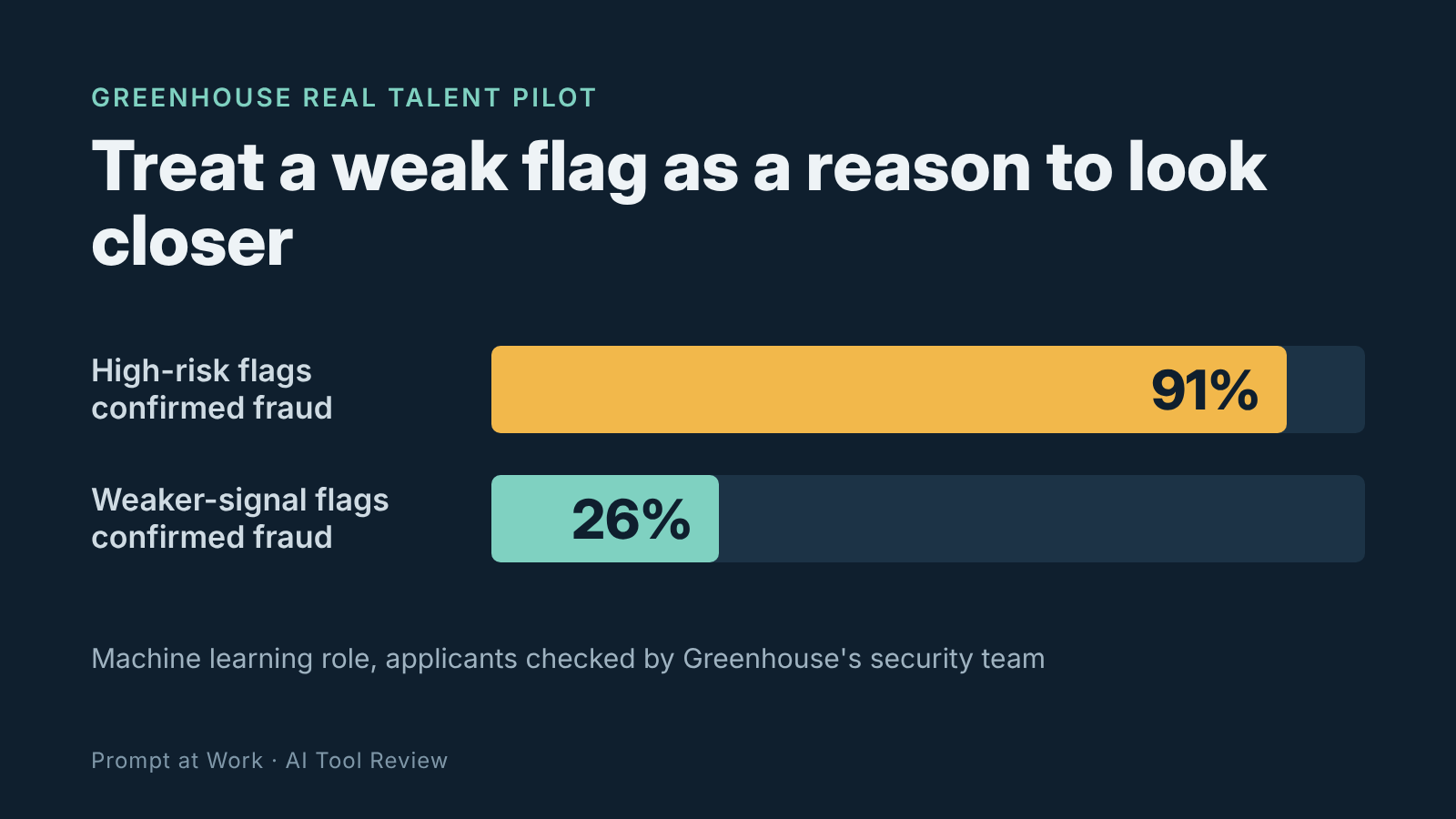
In a Greenhouse pilot for a machine learning role, 91% of high-risk applicants its security team checked were confirmed fraud. Applicants flagged only by weaker signals were confirmed just 26% of the time, so treat a weak flag as a reason to look closer, never as a rejection.
Ruling: fair. The fix exists, but it costs extra.
Will Talent Matching screen out good people?
A recruiter on Reddit said Talent Matching cleared out a lot of fraud, but they still check resumes by hand. Talent Matching puts each applicant in a group from "Strong match" to "Limited match", plus "Needs manual review", and never advances or rejects anyone. Weight 4 to 6 key skills, as the help page suggests.
The step teams skip is the Talent Matching assistant. On a job's Talent Matching page, open Application Review and click Configure with assistant. Type "mid-level backend engineers in Bengaluru with payments experience" and it drafts skills, weights, titles and filters; nothing saves until you click Apply setup. It's in beta and needs the Real Talent add-on.
I'd also switch on AI opt-out in the Talent Matching settings, even though it means more manual screening. Candidates then get a link in the job's AI disclaimer to ask for a human-only review.
Ruling: a fair worry, but the decision stays with you.
Scorecards nobody fills: reminders and Notetaker
A Reddit commenter advised switching on scorecard reminders "most teams never enable". The help page says they can't be switched off: by default, interviewers get an email an hour after the interview, then daily for up to 10 business days. What teams miss is the custom version under Job Setup > Notifications > Scorecard Reminders > Configure, which adds Slack reminders and follow-ups every 2 or 3 days.
The bigger help is Greenhouse Notetaker (Core, Plus and Pro, one credit per interview). It writes notes against each interview-kit question, and the interviewer pulls them in with Add to summary.
Ruling: mostly setup.
Shallow reports, and the MCP workaround
On Plus and Pro, report filters can be built from a typed sentence. The more useful route is Greenhouse MCP, in open beta on all three tiers. A Site Admin enables it under Dev Center > MCP Access; you then connect Claude, ChatGPT or Copilot Studio and ask which candidates have sat in one stage for two weeks. Your Greenhouse permissions still apply. A promised Analytics Chart Agent has no help page yet that says which tiers get it.
Ruling: partly fixed, depending on tier.
Configure > AI Tools: why everything needs an admin
For AI tools, this is accurate. Notetaker, Talent Matching and the rest are enabled by a Site Admin under Configure > AI Tools. The Candidate Insights Assistant (the Assistant icon on a candidate's profile) can only be turned on by your Customer Success Manager. Its answers don't link to the scorecards they came from, so check before quoting one in a debrief.
Ruling: fair.
OpenAI, 30 days, and what Notetaker keeps
Greenhouse says it doesn't train its models on the personal data it holds for customers. Most AI features run on OpenAI, which Greenhouse says deletes API inputs and outputs after 30 days. Notetaker videos go after 30 days by default (1 to 60 is configurable), but transcripts and notes stay.
Plans, add-ons and the off switch
- No free plan or public price; Core, Plus and Pro are quoted after a demo.
- Real Talent and the Voice AI interviewer are separate add-ons.
- Each AI feature can be turned off individually.
Three questions for your Greenhouse rep
- Is Real Talent on our contract, and does our tier run fraud reports automatically?
- How many Notetaker credits do we get, and what happens when they run out?
- Can you enable the Candidate Insights Assistant and MCP access for our recruiters?
Comments
Comments are reviewed before they appear publicly.