
GPT-6 Astra Is on Your Plus Plan. It's Just Not in Chat.
ChatGPT Plus already includes GPT-6 Astra, just not in Chat. Here's where it lives, the settings that decide how fast it drains your allowance, and what independent tests say it's good and bad at.
GPT-6 Astra is OpenAI's top model, released on 3 September 2026. It is built for long jobs: operating a computer, fixing code in a terminal, and turning a messy brief into a finished document or spreadsheet. ChatGPT Plus already includes it. The confusing part is where it sits, and a few settings decide whether it feels brilliant or drains your allowance before lunch.
On Plus, Astra lives in Work and Codex
Open the model menu in a normal chat and you won't find Astra there. OpenAI's help page says Plus includes GPT-6 Astra in ChatGPT Work and Codex, not in Chat. Inside Chat, Astra shows up as the Pro option on the Thinking slider (GPT-6 Pro), which needs a Pro, Business or Enterprise plan.
To reach it on desktop, pick ChatGPT from the top-left menu and switch the toggle from Chat to Work. On mobile, Work is in the dropdown at the top of the screen. If it's missing, update the desktop app from Menu, then Check for Updates.
The model chip and effort level in the Work composer
Work's text box lets you choose a project, plugins, the model and the effort level. Work and Codex share one usage pool, and OpenAI says Astra drains it faster than GPT-5.6 Sol.
That explains the loudest complaints. A Plus user reported on GitHub that Codex hit its limit about 20 minutes into a session, and a Pro user wrote on Medium that one simple coding task ate about 30% of his weekly allowance. StationX's test found maximum effort cost 5.3 times as much as low effort for a similar-quality code review. I'd start every Astra task on low or medium and raise it only when the answer clearly falls short.
Plan mode before a long Work task
Plan mode makes Work propose a strategy first, which you approve or correct before anything runs. On a vague brief, this step saves the most usage, because a wrong direction gets caught at the plan instead of an hour later.
In the desktop app, Work can also edit files on your computer. Its default permission asks before running commands outside the workspace or going online; Approve for Me and Full Access hand it more freedom. Keep the default until you've watched it for a week.
Settings, then Usage: check this before blaming the model
Settings, then Usage shows your remaining allowance and when it resets. A third-party write-up of OpenAI's estimate puts Plus at roughly 5 to 45 Astra messages every five hours in Work or Codex, depending on the task.
AGENTS.md now gets obeyed more literally
OpenAI's developer guide says Astra follows instructions in skills and files like AGENTS.md more closely than older models do, and suggests auditing them. If Astra keeps stopping to ask for approval, the same guide recommends saying in your prompt that it may work autonomously. The Codex command line needs version 0.153.0 or newer.
Not everyone sees obedience. A poster on OpenAI's developer forum said Astra skipped mandatory approval gates even after rewording. One report isn't a pattern, but I'd still read every change it makes to client code.
Terminal-Bench says yes, slide quality says Sol
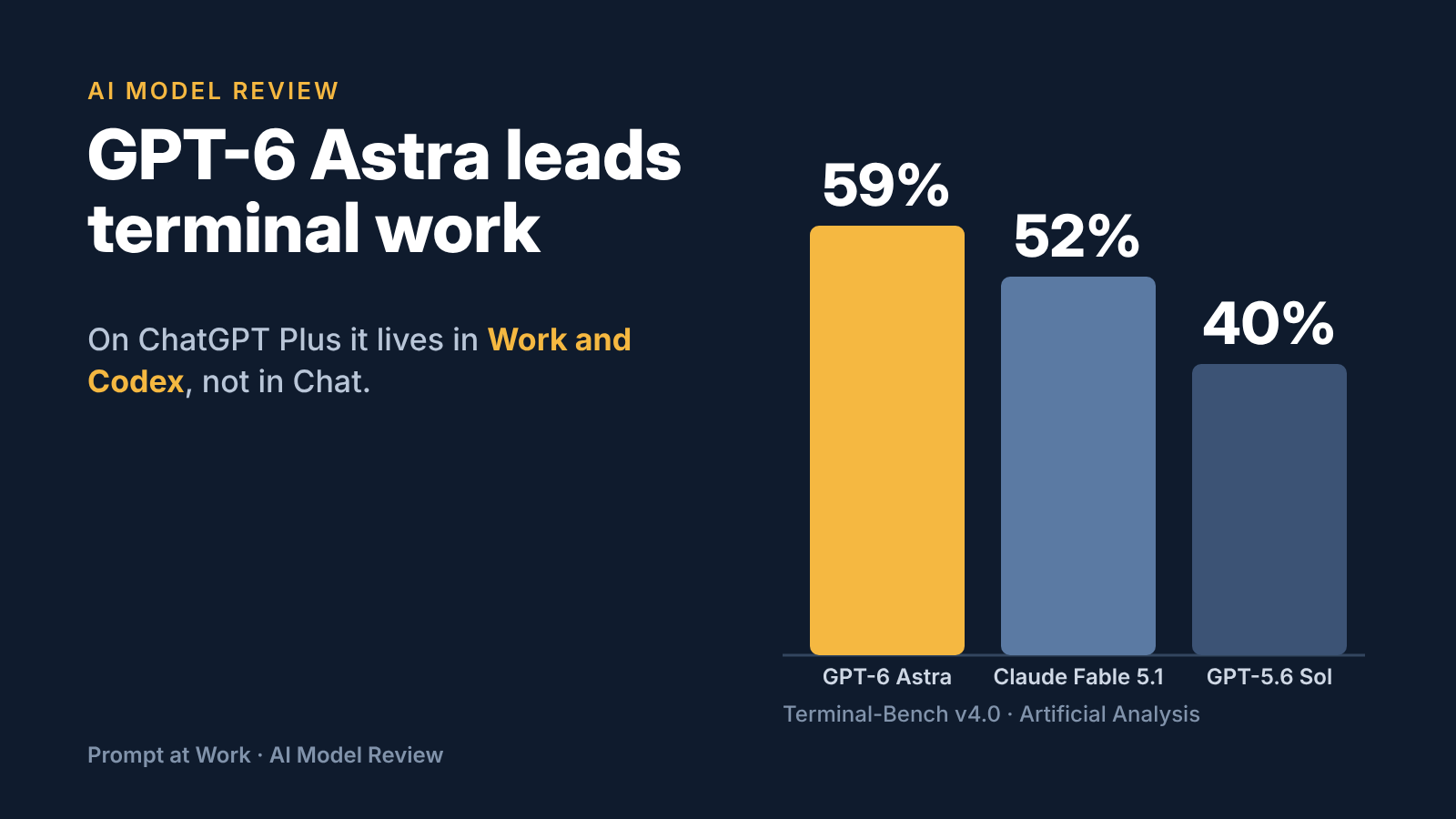
Artificial Analysis, which tests models independently, puts Astra first on Terminal-Bench v4.0 at 59%, ahead of Claude Fable 5.1 at 52% and GPT-5.6 Sol at 40%. On its knowledge test, the rate at which Astra guesses wrong instead of admitting it doesn't know fell from Sol's 92% to 51%. Better, but not safe for facts you won't check.
Two results cut the other way. On the same lab's document test, GPT-5.6 Sol still scores higher for presentation quality, and on GDPval-AA, a set of everyday professional tasks, Astra sits about 45 Elo points below Sol. For polished slides, Astra isn't automatically the upgrade.
A week after launch, people on X started saying Astra had got worse. Decrypt found the evidence anecdotal, so I'd call that unproven.
OpenAI rates Astra Critical for cybersecurity, so it refuses requests like a working exploit, even for code you own. In StationX's test, finding the flaw and writing the fix went through.
Quick facts
- Where: Work and Codex on Plus; Chat too on Pro, Business and Enterprise, where Enterprise admins must switch it on.
- API: model name gpt-6-astra, with tool calls only through the Responses API; $10 input and $50 output per million tokens.
- Context: OpenAI's launch page doesn't state a window, though its long-context tests run up to 1M tokens, about 7.5 lakh English words.
- Privacy: on personal plans, chats can train OpenAI's models until you turn off Improve the model for everyone under Settings, then Data controls. It covers Codex too; Business workspaces don't train by default.
- Try it: the cheapest confirmed route is Plus, at $20 a month plus 18% GST.
Keep Sol for chat, send Astra the long jobs
My rule: leave everyday questions on the regular GPT-6 Thinking levels, and open Work with Astra only for a task with a clear finished output, like a cleaned spreadsheet or a tested fix. Approve a plan, keep effort low, and check Usage afterwards. That way Plus gets you OpenAI's strongest terminal model without the week-one shock of an empty allowance.
Comments
Comments are reviewed before they appear publicly.