
New to Gamma? Don't Let It Rewrite Your Words
Gamma turns a prompt or a pasted document into slides in about a minute, and Gamma 5 adds an agent that plans the outline with you. Most complaints about it trace back to six first-week habits, each fixed from a menu.
On 6 October, Gamma released Gamma 5, a rebuilt version of its AI tool that turns a prompt, a pasted document or a PDF into a presentation, a document or a simple website. The new version adds an agent that talks through your outline before it builds anything, plus connectors that pull material from Slack, Granola, Fireflies and Fathom.
Gamma says over 100 million people use it, yet its Trustpilot score is 1.6 out of 5. Many of those complaints trace back to a few first-week habits. Here are six, with the menu that fixes each.
Letting Generate rewrite notes you already wrote
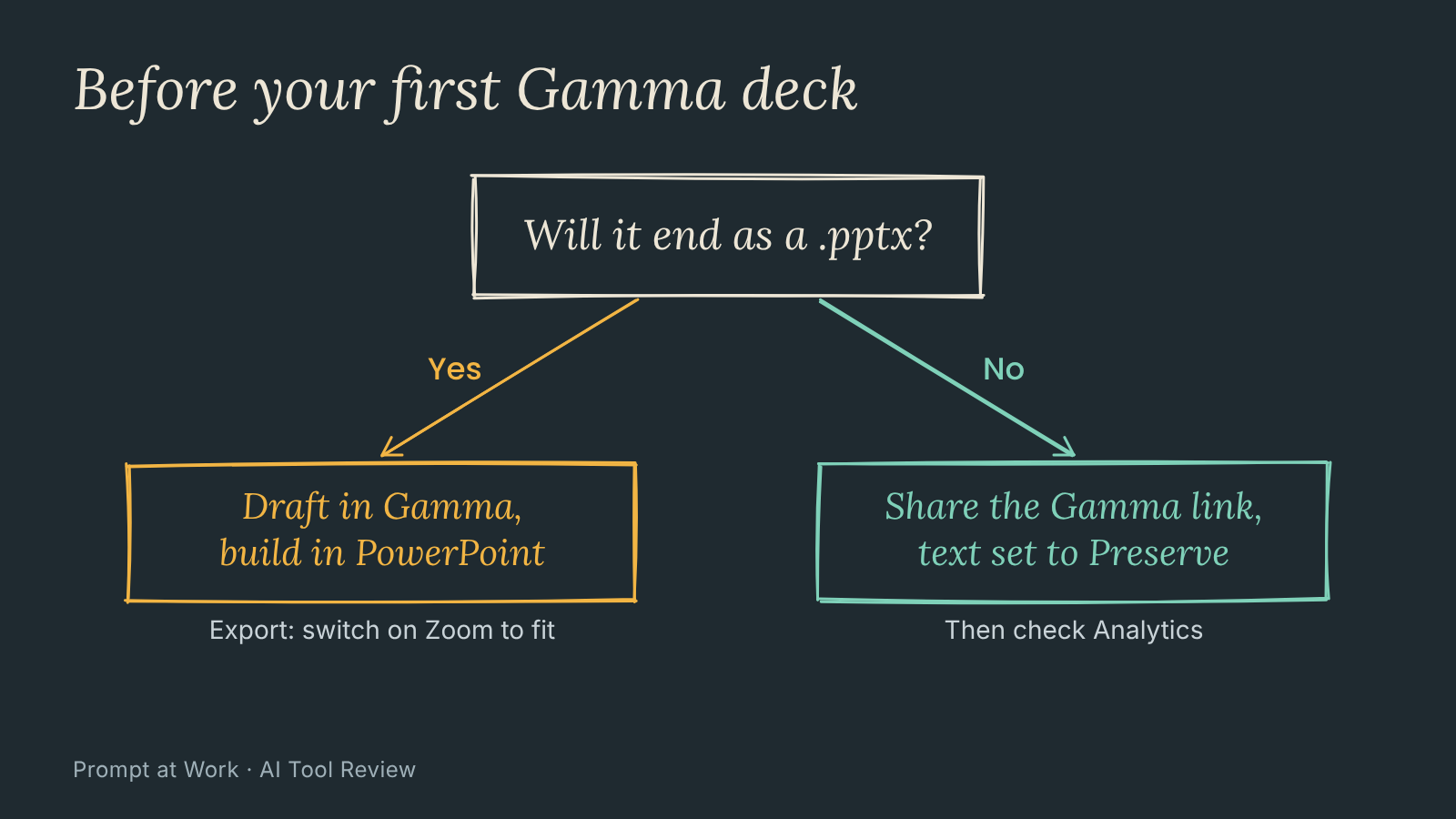
A common Trustpilot gripe is that the AI changes text nobody asked it to touch. Part of that is a setting new users never see. Paste text into the classic generator (click Use classic generator on the dashboard) and the outline page offers three modes: Generate adds detail, Condense trims to key points, and Preserve keeps your words. The lock icon beside Preserve only means your text is locked in place; the option itself is free to pick.
Gamma 5 has no buttons for this, so say it in the prompt ("keep my text exactly as written") and correct the Agent before you click Generate.
Spending the 400 free credits on full retries
The free plan's 400 credits arrive once and never refill. Every full retry spends from that pile. Gamma 5's agent lets you work on the argument and the audience before a single slide exists, and fixing an outline costs far less than regenerating slides.
Pick the language in the dropdown before you create, too. Translating a finished deck later means the AI edits one card per request.
Designing a deck that has to end up as a .pptx
This is the complaint I take most seriously. A request on Gamma's ideas board with over 300 votes describes exported PowerPoint files with cropped slides and tables that fall apart into loose text boxes. Gamma marks it "in progress" without a date.
You can soften it. Open Share, then Export, and switch on Zoom to fit, which every plan has. A user on the board points to Page setup in the same menu for slide size. Set backgrounds through Card styling on each card, because a theme-level background can vanish from PDF and PowerPoint files. In Google Slides, expect font swaps, since Slides ignores fonts embedded in a PowerPoint file.
My position: when a client insists on a .pptx in their corporate template, I'd build it in PowerPoint and use Gamma only to draft the structure.
Pressing Present without trying S or Presenter View
Press S while presenting to turn on Spotlight, which hides what you haven't reached so the room sees one section at a time. For notes, click the small arrow next to the Present button (not the button itself) and choose Presenter View. You get notes beside the slide and a Start Timer button for a fixed workshop slot. The help pages don't say which plans include these.
Keeping the stock theme everyone recognises
Trustpilot reviewers say every deck looks alike. Gamma 5 widened the style palette, but your own theme does more. Under Themes, click the three dots on any theme and choose Customize this theme. The Accent Colors section takes hex codes, and the Logo section puts your logo in the bottom-left corner of every card. Gamma 5 carries brand preferences into later projects, so it's a one-time job.
One gap I couldn't close: Gamma's pages disagree on custom fonts. The pricing page lists them under Pro, while the plans help article lists them under Ultra.
Sending a Gamma link without checking Analytics
If you share proposals as Gamma links, the three-dot menu at the top right has Analytics: how far viewers got, where they lingered and unique viewers over 30 days. Signed-in Gamma users show by name. Full analytics need Pro.
Data Controls: training is on for personal plans
On Free, Plus, Pro and Ultra, Gamma's help page says your content may be used to train its AI by default. Turn that off in Account settings, then Settings, then Data Controls. Business and Enterprise workspaces are excluded automatically.
Gamma in four lines
- Imports: PPTX and DOCX up to 200 MB, PDFs up to 100 MB, web links and Google Drive files.
- Free plan: 400 one-time credits, up to 10 cards per prompt and a "Made with Gamma" badge.
- Paid: the pricing page showed no prices when I checked; trackers list Plus at about $9 a month plus 18% GST.
- Training opt-out: Account settings, then Data Controls.
My call: Gamma earns its place for decks people will view as a link, like training handouts and internal updates. Switch to Preserve, set up your theme and Data Controls in the first session, and judge it after that. If your work has to end as a corporate .pptx, wait until that export request on the ideas board is marked done.
Comments
Comments are reviewed before they appear publicly.