
ChatGPT Images 2.6 Animates Photos and Remembers Your Characters
ChatGPT Images 2.6 adds two things 2.5 couldn't do: looping GIFs and saved characters you call with @. Here's each one on a real job, what the leaderboards say about Flare and Sunburst, and where it still falls short.
ChatGPT Images 2.6 is OpenAI's image model update, announced on 4 November 2026. It replaces Images 2.5 inside ChatGPT on every plan, Free included, and reaches developers as two API models: gpt-image-2.6-flare for speed and gpt-image-2.6-sunburst for quality.
OpenAI leads with "50% faster", but two new abilities matter more: it can animate, and it can remember a face. Here is each on a job you might have this week.
GIFs from a prompt or a still photo
Say you run a café's Instagram and want the Diwali offer poster to flicker like a diya. You upload the poster, describe what should move, and ask for a looping GIF. Afterwards you can change the playback speed, download it, or share a link to X, LinkedIn or Reddit.
Three things trip people up. GIF creation is still rolling out, so some accounts don't see it yet. ChatGPT can't edit an animated GIF you upload; it only animates stills and its own creations. And OpenAI hasn't published GIF limits for any plan.
Quality is the bigger catch. One tester's poster GIF came out "choppy, like a slideshow", and a Hacker News developer called the splotchiness on a simple chess animation a non-starter. The tester's fix is sensible: ask for a frame count and how long each frame stays, keep big objects still, and use the speed control instead of re-prompting.
I couldn't find anyone testing Hindi or Devanagari text inside a 2.6 GIF yet, so try one short line before you build a festival campaign around it.
Save Chester once, then just type @Chester
The second new ability matters more if you make a recurring series. Upload a photo of your pet, your mascot or yourself, ask ChatGPT to save it under a name, and in any later chat write something like "@Chester dressed as a pirate". No re-uploading.
TechRadar's test found ChatGPT saves the original photo, not the edited versions you made from it. What OpenAI hasn't documented is where saved references live, how many you can keep, or how to delete one. For a stock mascot that's fine. For a photo of your own face, I'd wait until there's a clear delete button.
Flare is fast, Sunburst is the one at the top
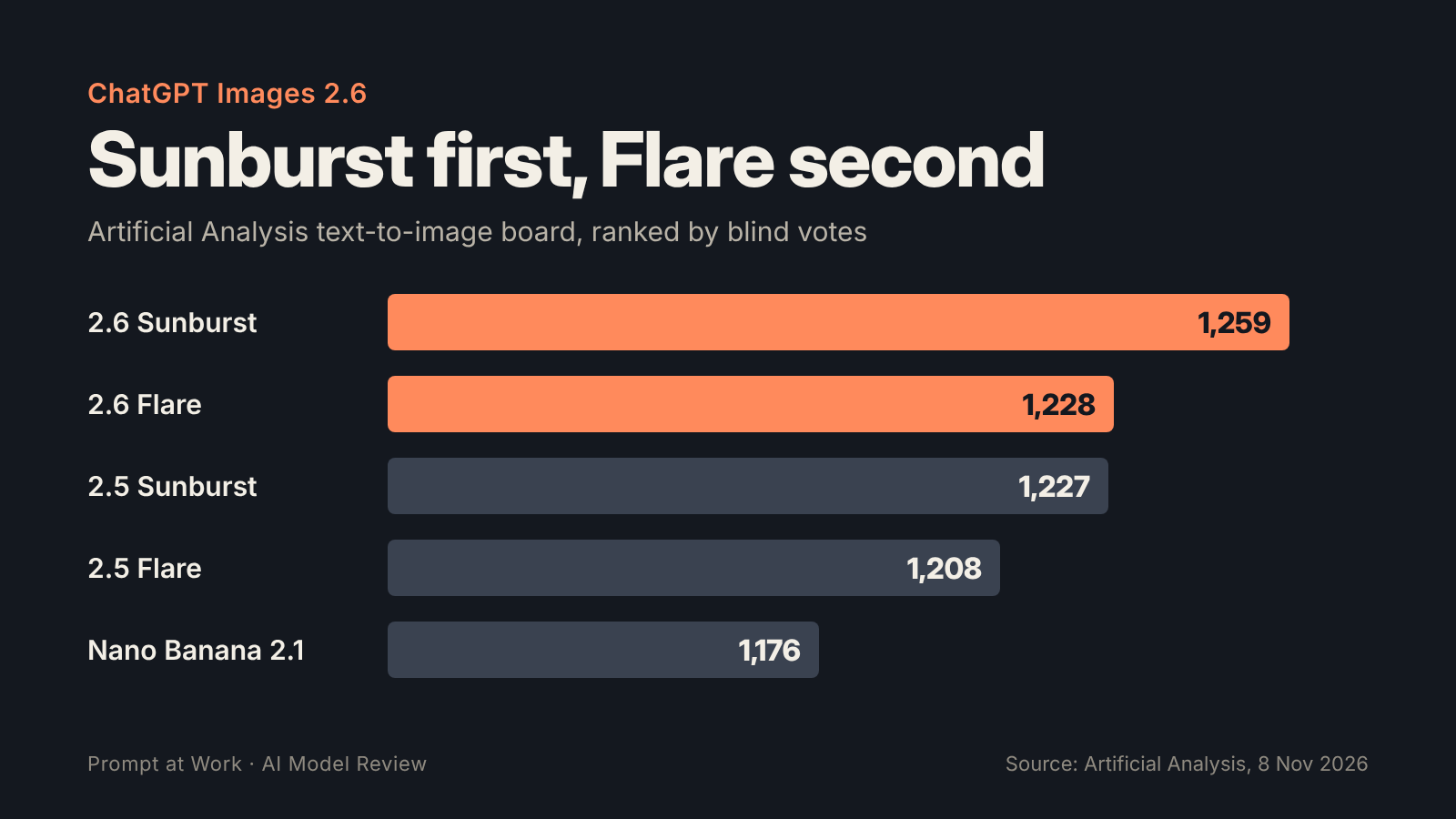
On the Artificial Analysis text-to-image board, which ranks models by blind votes, Sunburst is first with 1,259 and Flare second with 1,228, ahead of 2.5 Sunburst (1,227), 2.5 Flare (1,208) and Google's Nano Banana 2.1 at 1,176. Sunburst also leads the editing board. On Arena's own text-to-image board at launch, Sunburst placed second and Flare fourth.
The trade-off is time. In Artificial Analysis' runs at maximum quality, Flare took about 30 seconds an image against about 55 for 2.5 Flare, while Sunburst needed over two minutes. MxChat's API test got Flare back in 6 to 9 seconds at lower settings.
Where 2.6 is not an upgrade yet
Votes on a leaderboard aren't your prompts. One Hacker News developer rolled Flare back to 2.5 after an hour, finding it too simplistic or sometimes broken, while calling Sunburst solid.
Developers should also check the bill. MxChat measured a low-quality 2.6 Flare image using about four times the output tokens of 2.5 Flare. At high quality the two cost about the same, and 2.6 can't use the Batch discount. For thousands of cheap draft thumbnails, I'd keep 2.5 running and test 2.6 on a sample first.
For developers: complexity, markup and the 16-frame cap
- complexity: low, medium or high, default high. OpenAI's guide warns that higher complexity can add latency and unwanted changes, so drop it for simple edits.
- Markup editing: instead of a mask, draw on a transparent PNG layer the same size as your image to show where the change goes.
- GIF and SVG output: set output_format on the generations endpoint. The guide says up to 64 GIF frames, but a developer on OpenAI's forum found the API rejects anything above 16, with 9 as the default. SVG takes one image per request and can't come from an edit.
Images 2.6 in four lines
- Released 4 November 2026, on all ChatGPT plans including Free, across web, desktop and mobile.
- API: $30 per million image output tokens, unchanged from 2.5.
- Images carry Content Credentials and an invisible SynthID watermark.
- To keep your uploads out of training: Settings, Data Controls, turn off "Improve the model for everyone".
If you only try one thing, save a recurring character with @ and reuse it across three posts. That feature works today and saves real time. Treat GIFs as a fun extra for now, and give OpenAI a few weeks to fix the flicker before you promise a client one.
Comments
Comments are reviewed before they appear publicly.